 Appointment Trader
 Home
Home  Sign In
 Developers
  How It Works





 Reach new customers using the AppointmentTrader Social Network
|
By 🥷🏻 @ColorfulRod45 · Follow, 01/13/2026 2:17 pm
|

|
This post is here to inform users how to leverage special AT functionality to create posts that result in engagement similar to the metrics shown below:
 As you can see above, the post enjoyed an engagement of almost 30% and generated $15k in sales.
While the most important ingredient to a post of course is the content that is generated by the user, leveraging neutral AT functionality will substantially help you make useful posts for others.
1.) Categorization:
When you make a post make sure you select the appropriate forum for the post you want to create – e.g. if it is a post about a certain region, make sure to select the communities for that region, don’t just post to ‘The Best Restaurants’ – otherwise you will miss out on high-intent AT search traffic.
2.) Understand Benefits of Mention Clicks
If a user clicks on your mention and then proceeds to book the venue or service in question within 48 hours of clicking on the mention, the transaction will be tied to your post. If there are other people who mentioned the same place or service and the user clicked on in the 48 hours leading up to the booking the transaction will be tied back to multiple posts.
In that case two things happen:
• If the user created a bid, the people who mentioned the location and had a click from the user will receive a ‘direct hire’ bid for 5 minutes – this is key: If you mention locations or services and the user engages with your post, you’ll have dibs on the contract for 5 minutes!
• If you do not fill the bid but someone else does or a listing is sold you will receive a commission from that sale because of the click on that mention.
3.) Understand how engagement rate and special features technically work.
AT tracks engagement on posts for the following categories
• Likes
• Comments
• Mention Clicks
• Poll Votes
Hyperlinks (e.g. https://google.com) are supported, however clicks on these links do not count as engagement to avoid users being incentivized to link spam on AT.
While not all users can create Polls (you can do this after a certain medal threshold), all users can use mentions – these are powerful as posts will track revenue tied back to clicks on these mentions as mentioned before.
Helpful posts with High Engagement automatically and algorithmically rank on the front page, AppointmentTrader does not endorse or promote individual listings or services.
If your organic engagement on a post is high, they also automatically and algorithmically get distributed to followers of the board you are posting in or to users who have shown interest in the region you have generated transactions in.
This is key: Even if you don’t have a big following you can absolutely reach ten’s of thousands of customers that can book you directly by creating useful posts.
Your way of measuring whats’ useful for customers is to look at your and other posts engagement rate and mention clicks to learn what users in the respective markets are looking for.
4.) Use the mentions!
You can open the mention block by tying the [AT] sign.

You can then either mention a location or a service as follows:

Once you click on it, the tag converts like this:
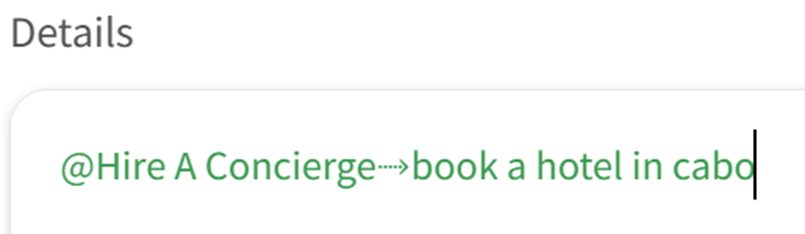
When clicked the mention opens a custom concierge request with the content you entered, you can try it here: book a hotel in cabo
Tip: You can test the mentions in your support chat, or in the comments here!
 Share
Share

 Learn how to make high-engagement posts
|
0 Answers
0 Comments |
Give the best answer |

The best answer has not been selected yet.

but at least 3 Thumbs Up's from other users is selected as the best answer.
10 Posts of the entire Community with the most, but at least 5 Thumbs Up's will appear in the
 Best Posts section of .
Being in the Best Posts section comes with perks, the asking user and the person who answered will both receive Traderpoints for every paid AppointmentTrader transaction at .
Traderpoints can be used to pay for Transactions on AppointmentTrader.
Check out the AppointmentTrader Communities to learn how users convert Traderpoints to cash.
